
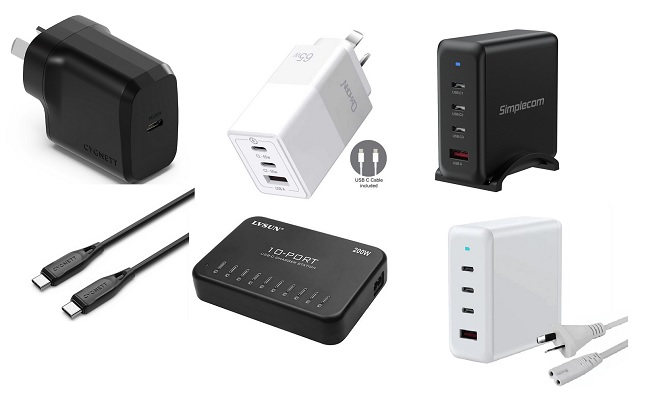
USB‑C is a 24‑pin reversible connector that merges power delivery, data transfer, and video output. It negotiates up to 100 W, letting laptops, phones, and monitors charge and communicate bidirectionally. High‑speed pairs support up to 20 Gbps for USB 3.2 and 40 Gbps with Thunderbolt 3/4. Alternate Mode repurposes pins for DisplayPort or HDMI. Many modern smartphones, laptops and accessories already use USB‑C, replacing older ports. The next sections explain cable selection and legacy comparisons to guide your setup choices.
Key Takeaways
- USB‑C is a 24‑pin, reversible connector that combines charging, data, and video into a single cable.
- It supports USB‑PD power delivery up to 100 W (5 V‑20 V), enabling laptop and monitor charging.
- Data rates range from 5 Gbps (USB 3.2 Gen 1) to 40 Gbps with Thunderbolt 3/4.
- Alternate Mode repurposes pins for native DisplayPort, HDMI, or PCIe video output without adapters.
- Choosing a cable requires matching its speed, power rating, and certification to the device’s requirements.
What Is USB‑C and How Does It Work?
Although many devices now feature the same reversible connector, USB‑C is a 24‑pin, symmetrical interface that consolidates data transfer, video output and power delivery into a single cable.
The standard defines a set of high‑speed differential pairs capable of 10 Gb/s (USB 3.2 Gen 2×2) and optional lanes for Thunderbolt 3/4 at 40 Gb/s. Power Delivery negotiates up to 100 W via a bidirectional 5‑V to 20‑V range, allowing laptops, monitors, and chargers to exchange energy dynamically. Alternate Mode repurposes the same pins for DisplayPort, HDMI, or PCIe signals, enabling a single connector to drive external displays or storage enclosures.
Host and device controllers communicate through a USB‑PD protocol stack, handling authentication, role‑swap, and safety checks without user intervention today. Proper installation also benefits from good signal strength to maintain reliable power delivery.
Why the Reversible Design Matters
The symmetrical, 24‑pin connector of USB‑C eliminates orientation constraints, allowing users to insert the cable either way without concern for polarity.
This reversibility reduces user error, speeds connection time, and lowers mechanical stress on ports, extending device lifespan. It also simplifies inventory for manufacturers and retailers, as a single cable type serves multiple device orientations.
- Faster plug‑in because orientation no longer matters.
- Decreased wear on connectors from fewer mis‑inserts.
- Greater accessibility for users with limited dexterity.
- Uniform cable design streamlines production and logistics.
How USB‑C Boosts Data Transfer Speed
USB‑C supports up to 40 Gbps with Thunderbolt 4 and USB4, delivering substantially higher bandwidth than legacy connectors. This capability stems from its symmetrical 24‑pin architecture, which enables simultaneous use of multiple data lanes. Optimized protocol stacks further streamline handshaking and error correction, accelerating transfer speeds.
Higher Bandwidth Capabilities
Because the USB‑C connector supports USB 3.2, USB4, and Thunderbolt 4 standards, it can deliver up to 40 Gbps of raw throughput, far surpassing the 5 Gbps limit of legacy USB‑A ports.
These rates allow uncompressed 8K video, swift SSD duplication, and concurrent device charging without bottlenecks. The symmetrical plug also reduces latency by eliminating direction‑specific pins. Such capacity also supports dual‑channel PCIe lanes, enabling external graphics enclosures and professional audio interfaces to operate at native speeds.
Key bandwidth tiers include:
- 10 Gbps for USB 3.2 Gen 2×2
- 20 Gbps for USB 4 baseline
- 40 Gbps for USB 4 and Thunderbolt 4
- Backward compatibility to 5 Gbps USB 2.0
Consequently, modern laptops and peripherals can exchange large datasets in seconds, making USB‑C the preferred conduit for high‑performance workflows. Adoption continues across smartphones, tablets, and gaming consoles worldwide today.
Optimized Protocol Stacks
Leveraging the raw throughput described earlier, the protocol stack implemented over USB‑C consolidates multiple communication layers to reduce latency and overhead.
It merges the physical, link, and transport tiers into a streamlined sequence that eliminates redundant handshakes and enables direct memory access between host and device.
By employing USB 4’s tunneling mechanism, video, storage, and networking packets share a single high‑speed conduit, while the embedded DisplayPort and Thunderbolt protocols negotiate bandwidth dynamically based on workload.
Adaptive packet scheduling prioritizes time‑critical streams, preventing bottlenecks when simultaneous 4K video and 10 Gbps data transfers occur.
The result is a consistently low round‑trip time, allowing SSDs, external GPUs, and docking stations to achieve near‑theoretical transfer rates without additional driver layers.
Thus, USB‑C delivers seamless high‑performance connectivity across all devices.
Which Devices Already Use USB‑C?
Many modern smartphones and tablets have adopted USB‑C as their primary charging and data port. Laptops and Chromebooks across the price spectrum now ship with USB‑C for power delivery and peripheral connectivity. Recent gaming consoles and related accessories also incorporate USB‑C to support fast charging and high‑speed data transfer.
Smartphones And Tablets
Modern smartphones and tablets have largely converged on USB‑C as the standard charging and data port. Manufacturers adopt the connector to streamline accessories, improve data rates,
Laptops And Chromebooks
Although USB‑C has become the dominant connector for laptops, a broad spectrum of models already rely on it for power, data and video. Major manufacturers such as Dell, HP, Apple, Lenovo and ASUS ship ultrabooks and 2‑in‑1 convertibles with native USB‑C charging and Thunderbolt support. Chromebooks from Google’s Pixel line and budget brands like Acer also integrate the port for fast charging and peripheral connectivity. The shift simplifies docking stations, external monitors and SSD enclosures, eliminating legacy adapters. Consumers benefit from a single reversible cable that can sustain up to 100 W, deliver 4K video, and transfer gigabit speeds, making cross‑device workflows more seamless.
| Brand | USB‑C Models |
|---|---|
| Dell | XPS 13, Latitude 7320 |
| Lenovo | ThinkPad X1 Carbon, Yoga 9i |
All these models support full USB‑C functionality.
Gaming Consoles And Accessories
USB‑C integration across gaming hardware has accelerated as manufacturers adopt the connector for power, data, and video needs. Modern consoles and peripherals now rely on the reversible interface to streamline charging, firmware updates, and external display connections. The shift also reduces cable clutter and future‑proofs devices for emerging standards.
Notable implementations include:
- Nintendo Switch uses USB‑C for power, docked video output and accessories.
- Xbox Series X|S controller uses USB‑C for charging and wired play.
- PlayStation 5 DualSense uses USB‑C for rapid charging and audio transmission.
- Valve Steam Deck uses USB‑C for charging, video out via DisplayPort Alt Mode and docking.
It also enables fast firmware updates and data sync. These examples illustrate how USB‑C is becoming the default link for gaming ecosystems.
USB‑C vs. Older USB Standards: Key Differences
While older USB versions require separate Type‑A or Micro‑B plugs for charging, data transfer, and video output, USB‑C merges these functions into a single, reversible connector. Unlike the rectangular Type‑A, which inserts only one way, USB‑C’s symmetry eliminates orientation errors and reduces wear.
The connector houses 24 pins, enabling up to 100 W power delivery, far surpassing the 2.5 W limit of USB 2.0 and the 4.5 W of early USB 3.0 ports. Data throughput also rises: USB 2.0 caps at 480 Mbps, USB 3.0 at 5 Gbps, while USB‑C implementations support USB 3.1 Gen 2 (10 Gbps) and USB 3.2 (20 Gbps) or Thunderbolt 3/4 (40 Gbps). Alternate Mode allows native video signals such as DisplayPort or HDMI without extra adapters, consolidating functions that previously required separate cables. Legacy ports remain usable through adapters, but performance depends on cable quality.
How to Choose the Right USB‑C Cable for You
Selecting the appropriate cable hinges on the specific capabilities highlighted in the previous discussion of USB‑C’s multifunctional design. Consumers should match cable specifications to device requirements, considering data speed, power delivery, and build quality. This prevents buying over‑engineered or under‑performing accessories.
- Data rate: choose 5 Gbps for basic peripherals, 10 Gbps for SSDs, or 20 Gbps for Thunderbolt gear.
- Power delivery: verify wattage; 60 W for laptops, 100 W for high‑performance machines.
- Connector durability: look for reinforced strain relief and aluminum housing for frequent bending.
- Certification: prefer cables bearing the USB‑IF logo to ensure compliance with standards.
Frequently Asked Questions
Can USB‑C Replace All Legacy Ports in Older Laptops?
USB‑C cannot entirely replace all legacy ports in older laptops; while it can handle power, data, and video via adapters, many devices still require dedicated HDMI, Ethernet, or SD slots unavailable without additional dongles today.
Is It Safe to Use Any USB‑C Charger With My Device?
No, it is not safe to use any USB‑C charger with the device; only chargers that match the device’s required voltage, current and Power Delivery profile should be employed to seriously avoid damage or malfunction.
How Does USB‑C Support Video Output Like HDMI or Displayport?
USB‑C supports video output by implementing the Alternate Mode (Alt Mode) specification, which routes HDMI or DisplayPort signals through the connector’s high‑speed lanes, allowing compatible devices to transmit video directly to external monitors and TVs.
What Are the Environmental Impacts of Switching to USB‑C?
Switching to USB‑C reduces e‑waste by consolidating connectors, but manufacturing new cables and adapters consumes resources, and legacy device disposal generates waste; overall impact depends on recycling rates and consumer adoption speed globally and policy.
Will Usb‑C Become the Universal Standard for All Future Devices?
It is likely that USB‑C will become the universal standard for future devices, given widespread industry adoption, regulatory endorsement, and technical advantages, although legacy ports may persist during transitional periods across consumer and professional markets.
Conclusion
USB‑C has become the universal connector for modern electronics, offering reversible plug orientation, rapid data rates, and robust power delivery. Its adoption across smartphones, laptops, tablets and accessories demonstrates a clear industry shift toward streamlined connectivity. By understanding the technical advantages and selecting appropriate cables, consumers can fully leverage its capabilities while ensuring compatibility and safety. As legacy ports fade, USB‑C is poised to remain the dominant standard for years to come in the marketplace.
Next USB-C charger article: The Evolution of Charging Technology: From Micro-USB to USB-C
Previous USB-C charger article: Why USB-C Is the Future of Charging
Please also read our Ultimate USB-C charger guide right here at www.stormscale.net and be sure to check out our USB-C charger reviews for more detailed reviews of USB-C chargers and USB-C cables.